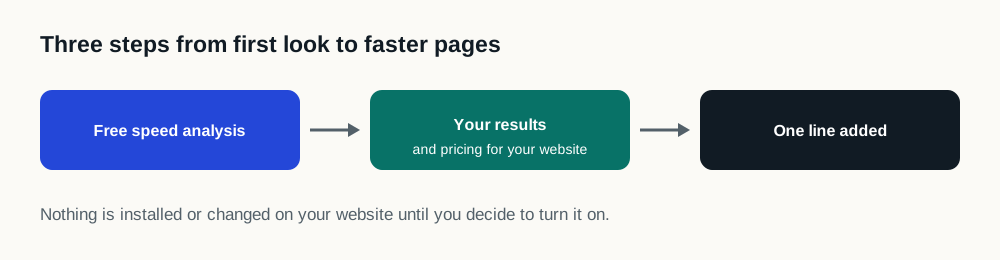
How is Speed Engine installed?
DealerSpeed Engine is a lightweight JavaScript tag installed on the dealership website already in place. The tag controls when third-party scripts run, so the inventory, pricing and lead actions a shopper came for are not left waiting behind them, and it requires no redesign, no CMS migration and no platform change.
The dealership keeps its website provider, design, inventory and vendor tools.
There is no new website for the marketing team to learn and no second version of the site to maintain.
What does Speed Engine actually change?
Dealer websites ask a browser to process inventory, personalization, chat, trade, digital retailing, analytics, advertising and compliance technology. When everything tries to arrive at once, useful content can be forced to wait. That accumulation, not the platform underneath it, is usually why a dealer website is slow.
Speed Engine reorganizes that work, so the browser reaches the important website experience sooner while lower-priority resources complete in a more controlled order.
Does the dealership have to manage it?
Once installed, Speed Engine operates in the background. It does not require the dealership to monitor a dashboard, adjust weekly settings or coordinate another campaign calendar.
Product updates and performance rules remain part of the Speed Engine service instead of becoming another task for dealership personnel.
What protects the original website?
The dealership website is always the fallback. If Speed Engine cannot operate safely on a page, it stops and the shopper gets the site the dealership already has: unchanged, with nothing missing and no broken intermediate state. The dealership is never left worse off than before it was installed.
The things that must never break, inventory, pricing, lead forms, consent, accessibility, are agreed with the dealership in writing before installation, and every one is exercised on that dealership’s own site before shoppers see the change. The full safety standard sets out what is checked and how a dealership stops it in one instruction.
| Safeguard | What it means |
|---|---|
| Protected list | Agreed in writing before installation: the things that must never break, including inventory, pricing, lead forms, consent and accessibility |
| Fails open | If it cannot operate safely on a page, it stops and the shopper gets the original site, unchanged |
| Verified before shoppers see it | Every protected item is exercised on the dealership's own site before the change goes live |
| No day-to-day management | No dashboard to watch, no weekly rules to tune, no campaign calendar |
| Same-day off switch | Turning it off is a same-day request, not a scheduled release |
| Concurrent-control measurement | Compared against a control group on the dealership's own traffic, not a before-and-after screenshot |
How is the result measured?
On the dealership’s own website, with its own shoppers, not on a demonstration site, and not as a before-and-after screenshot taken on two different days. A dealership sees what changed on its own traffic.
How that comparison is set up is fixed in writing before any result is read, so the answer cannot be chosen after the fact. Reporting says what was tested, when, and what the data showed. No result is published as a universal promise, and the measurement methodology explains why.
What actually changes on the website?
Nothing a shopper can see, and nothing a marketing team has to relearn. The design does not change, the content does not change, the inventory feed does not change and no vendor is removed. What changes is the order in which the browser is asked to do the work the page already requires.
The reason that is worth doing is that browsers have a single main thread and dealership pages ask a great deal of it at once. Inventory rendering, chat initialization, trade valuation, digital retailing, tag managers and compliance scripts all want to run during the same window the shopper is waiting for pricing and photographs. Each vendor tested its own script in isolation and concluded it was lightweight, and each was probably right. The total is what the shopper experiences, and nobody owns the total.
Speed Engine is designed to own that ordering decision: give the content a shopper came for a clearer path, let lower-priority work complete afterwards in a more controlled sequence, and leave the set of tools on the site exactly as the dealership chose it.
What does a dealership have to do?
Install it once, and confirm the implementation-specific protected list during setup. After that the design intent is that there is nothing to manage: no dashboard to watch, no weekly rules to tune, no campaign calendar, no new vendor meeting.
The setup step exists because the protected list is not generic. Which resources must never be deferred depends on the platform, the tools installed and how the dealership has configured them, so that list is built from the actual site, not assumed. That is the part that takes a conversation, and it is the part that determines whether the safeguards mean anything.
How would a dealership know it worked?
By comparing the optimized experience against the original one on the same website, at the same time, with the dealership's own visitors, not by comparing this month's screenshot to last month's.
The reason for the insistence is that dealership traffic moves for reasons that have nothing to do with a speed project. Inventory turns over, incentives start and stop, campaigns launch, seasons shift demand and the platform ships releases. A before-and-after comparison attributes all of that to whatever changed in between, which flatters a vendor as often as it buries a real improvement. A concurrent control does not have that problem, and it is what the measurement methodology requires before any figure is reported.