The tools pile up
Every tool on a dealer website was added for a reason. Sales wanted chat. The used-car manager wanted a trade-in tool.
Each agency added its tracking, and a manufacturer program added its own. Nobody removes the old ones, and nobody owns the total.
Each vendor checks its own tool on its own and finds it light. The shopper's phone gets all of them at once. More on third-party scripts.
Vehicle photos are heavy
A vehicle detail page can carry dozens of photos. Two things make them slow: photos sent at full camera size to a small phone screen, and every photo in the gallery downloading before the shopper has looked past the first one.
Phones feel it most
A mid-range phone on a cell signal runs the same page far slower than the office computer where the site gets checked. That's why a site can feel fine at the dealership and slow to shoppers, and why Google scores Core Web Vitals for phones separately. See why dealer sites are slow on mobile.
The server can add a wait before anything shows
Before the page can start, the browser waits for the first byte from the server. That wait includes redirects, the connection and the server building the page. If it's slow on every page, it's a question for your website provider. More on Time to First Byte.
What the data says
In our measurement of 140 dealership websites, 15 passed all of Google's speed measures on phones and desktops. The typical site loaded its main content in time but moved around while loading and answered taps late. Both trace to what's added on top of the page: late banners, chat bubbles, and tools starting up while the shopper taps.
How to fix it
- Remove tools nobody uses anymore, like tracking from campaigns that ended.
- Ask your website provider to size photos for the screen and load the gallery as the shopper scrolls.
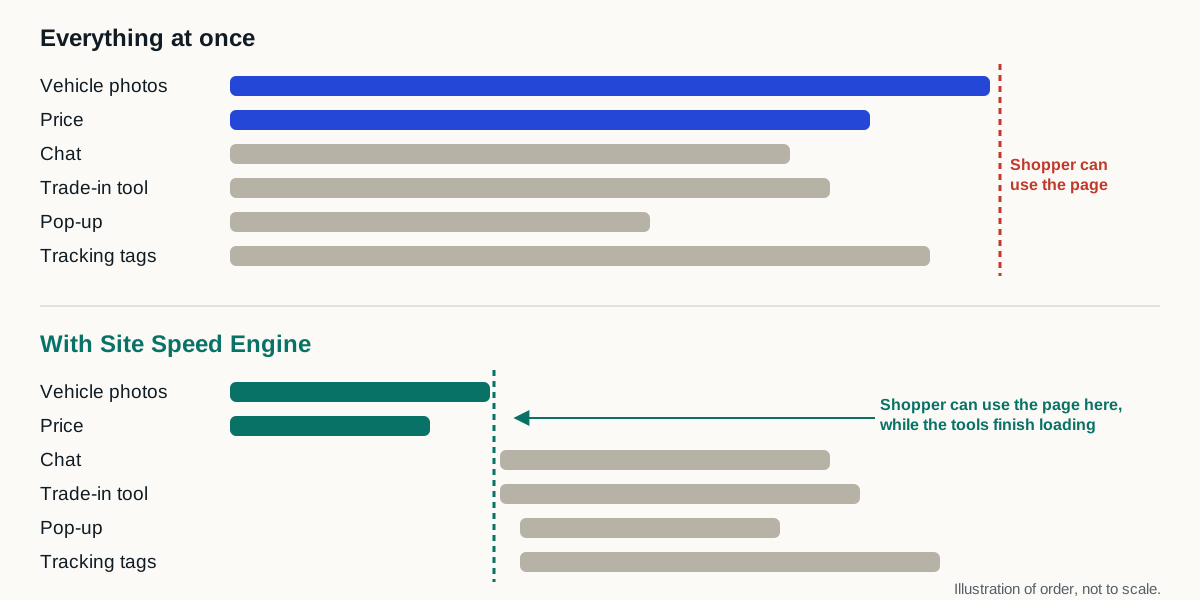
- Keep the tools that bring in leads, and make them load after the vehicle and price. That's what Site Speed Engine does, on every page, without removing anything.