This guide is part of the dealer website speed resource library.
Why mobile performance is different
A shopper may browse on a midrange phone while moving between cellular conditions. The device has less processing capacity than a desktop test machine, so image decoding, JavaScript execution, and layout work can take longer.
The same page can therefore feel responsive on an office computer and delayed on a shopper’s phone.
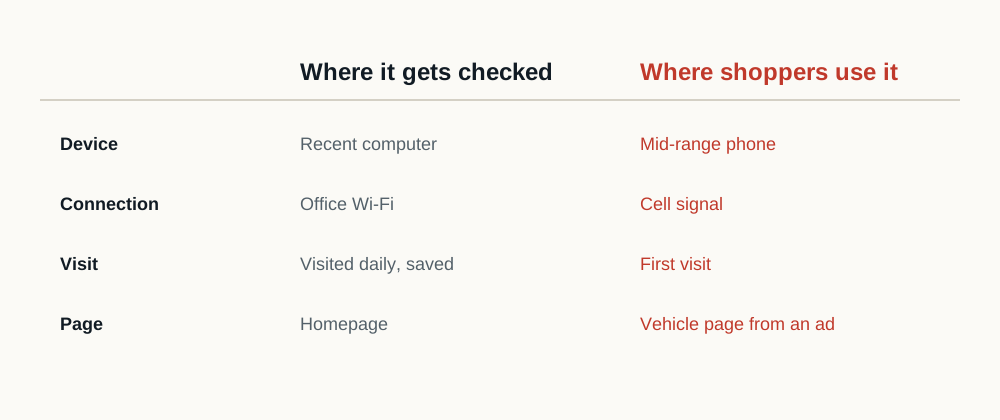
| Factor | In the dealership | For the shopper |
|---|---|---|
| Device | A recent desktop or a staff phone on the newest hardware | A mid-range phone, often several years old |
| Network | Office wifi on a business connection | Mobile data, sometimes on a weak signal |
| Cache | Warm, because staff visit the site daily | Cold, on a first visit |
| Entry page | The homepage, typed or bookmarked | A vehicle detail or paid landing page, which carries more third-party weight |
Test dealership tasks
- Open and filter inventory on the SRP.
- Load a VDP gallery and reveal pricing or incentive details.
- Open chat or trade tools only after the primary page is usable.
- Tap navigation, payment, directions and lead actions.
- Confirm that late content does not move the control being tapped.
Use lab and field evidence together
A throttled laboratory test is repeatable and useful for tracing the loading sequence. Chrome field data, when available for the page or origin, summarizes eligible real-user visits over time.
Neither source answers every question. Use laboratory data to diagnose and field data to understand the population represented by available real visits, which is the distinction PageSpeed Insights reports side by side.
Report the limits
Document device emulation, network settings, location, cache state, page template, test date, and whether the field dataset is page-level or origin-level. Do not present a single run as a universal mobile outcome.
Why is mobile harder than desktop?
- Phone processors parse and execute JavaScript several times slower than desktop
- Mobile networks add latency to every request in a dependency chain
- Smaller viewports mean overlays and banners cover more of the content
- Battery and thermal limits throttle sustained processing
- Google assesses mobile separately, so desktop performance does not compensate
How do I test mobile honestly?
- 01
Use the default mobile profile
PageSpeed Insights emulates a mid-range device on a throttled connection. That is closer to your shoppers than the phone in your pocket.
- 02
Do not test on office wifi
A fast connection hides the network cost that dominates the real mobile experience.
- 03
Test vehicle detail pages
The heaviest pages on the hardest devices is where the problem actually lives.
- 04
Check interaction, not just load
A page that renders quickly and then ignores taps still fails the shopper and fails Interaction to Next Paint.
Why does the same page feel fine in the office and slow to a shopper?
Because the office is close to the best case available and the shopper is usually somewhere near the middle. A desktop machine on a wired connection has several times the processing capacity and a fraction of the latency of a midrange phone moving between cell towers in a parking lot, which is where a meaningful share of dealership traffic actually happens.
Processing capacity is the part most often underestimated. Bytes can be compressed; JavaScript execution cannot. A script that parses and runs in 80 milliseconds on a laptop can take four or five times that on a mid-tier Android device, and dealership pages ship a lot of script. That is why the gap between the internal impression and the shopper's experience is widest on exactly the pages that carry the most tools.
It is also why mobile is assessed separately by Google instead of averaged with desktop, and why a dealership reviewing one number should make sure it is the mobile one.
What should a mobile test record?
Enough that the result can be defended later: the device emulation used, the network settings, the location, the cache state, the page template, the date, and whether the field data available is page-level or origin-level. Origin-level data pooled across templates is the most commonly misread figure in this whole exercise. It can look healthy while the vehicle detail pages, which have too little individual traffic to qualify, are the problem.
Test on a real phone at least once as well. Emulation is repeatable and useful for tracing, and it does not reproduce a cold radio, a saturated tower or a device that has been thermally throttled for twenty minutes. Those are ordinary conditions for a shopper standing on a lot.
Sources and further reading
External sources support the general technical guidance on this page. They do not represent a DealerSpeed Engine performance result.