01

Why are photographs the heaviest part of a dealership page?

Because a dealership sells a physical object that a shopper cannot stand next to. Inventory photography is the substitute, so a vehicle detail page opens with a gallery and a search results page repeats a thumbnail for every car in stock. Both are doing their job. Both are also, on most sites, the largest category of bytes the browser is asked to fetch.

That matters more than the raw number suggests, because the largest element in the visible area on a dealership page is usually a photograph. Image delivery is not one factor among many for that metric. On these pages it is very often the whole of it.

02

What is usually wrong, and what is usually fine

The instinct is to reduce the number of photographs or their quality, and it is almost always the wrong lever. Shoppers want more photographs of a used vehicle, not fewer, and a dealership that publishes eight images of a car it is asking thirty thousand dollars for is not helping itself.

Where the weight actually comes from
PatternWhat it costsWhat to do instead
A full-resolution file in a thumbnail slotThe browser downloads every pixel and then throws most of them awayServe a file sized for the slot it lands in, per screen size
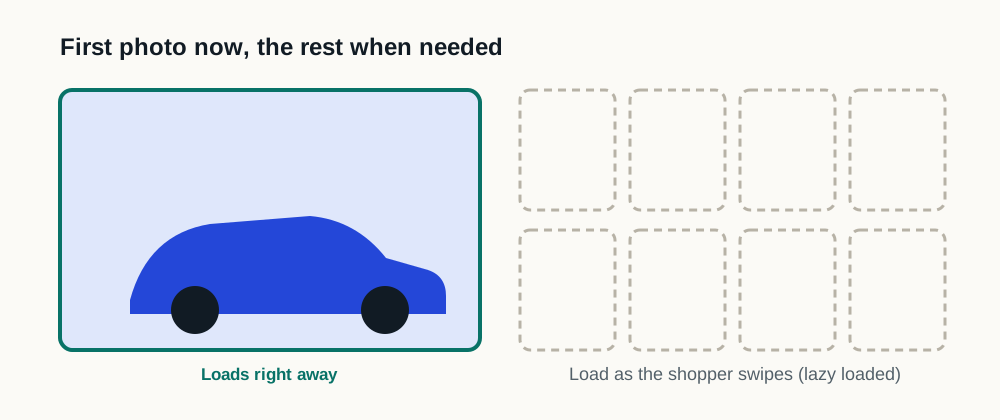
Every gallery image loaded at onceA shopper who never opens the gallery still pays for all of itLoad the first image immediately, the rest as they are reached
Images with no declared dimensionsThe page reflows as each photograph arrivesDeclare width and height, or an aspect ratio, on every image
Older file formats for photographyLarger files for the same visible qualityA current format with a fallback for anything that cannot read it
Fewer or lower-quality photographsShoppers get less of what they came forNot a speed strategy; fix delivery instead
03

How should a gallery load?

Two versions of the same vehicle detail page. In the first, every photograph in the gallery is requested when the page loads, including the ones behind a control the shopper may never open. In the second, only the photograph visible without scrolling is requested immediately; space is reserved for the rest, which are requested as the shopper reaches them. The drawing shows which requests are made and states no duration or measured result.
Which requests are made, not how long anything takes. Every photograph stays available either way, only the timing of the request moves.
  1. 01

    The first image is not lazy

    The photograph a shopper sees without scrolling should load with the page. Marking it lazy delays the one image the page is judged on.

  2. 02

    The rest load on approach

    Every image below the fold, and every image behind a gallery control, loads when the shopper approaches it. On a forty-photograph listing this is the difference between one download and forty.

  3. 03

    Reserve the space

    The gallery frame should occupy its final dimensions before any photograph arrives, so nothing moves when they do.

  4. 04

    Match the file to the slot

    A thumbnail rail, a gallery viewer and a full-screen view are three different sizes and should not be three copies of the same file.

  5. 05

    Check the search results page too

    It repeats a thumbnail per vehicle and is easy to forget, because most testing starts on a vehicle detail page or the homepage.

04

How does this show up in a test?

In a laboratory report it appears as properly sized images, next-generation formats, deferred offscreen images and the identity of the largest contentful element. Those four together usually describe most of a dealership page's image problem, and the report names the specific files.

In field data it shows up as Largest Contentful Paint, and in layout stability when the dimensions are missing. Run the pages that matter through the testing procedure instead of the homepage alone: a homepage hero is one image and a search results page is thirty.

05

Who controls this on a dealership website?

Usually not the dealership directly, which is the practical difficulty. Inventory photography is uploaded to a feed or a vendor tool, the website platform decides how it is stored and served, and the dealership sees the result instead of the mechanism. That does not make it unfixable. It makes it a question to ask, with the answer written down.

Ask the website provider what sizes are generated, whether the format is chosen per browser, whether images below the fold are deferred, and whether dimensions are declared. Those four answers, and the complete third-party inventory alongside them, are what separate an image problem from a script problem.

Sources and further reading

External sources support the general technical guidance on this page. They do not represent a DealerSpeed Engine performance result.