The two parts of the report
| Compare | Real-visitor data | Lab score |
|---|---|---|
| What it is | Real Chrome visits over the last 28 days | One simulated visit on a mid-range phone |
| Used by Google | Yes | No |
| Low-traffic sites | Often missing | Always there |
| Best for | Knowing what shoppers get | Finding what's slowing the page |
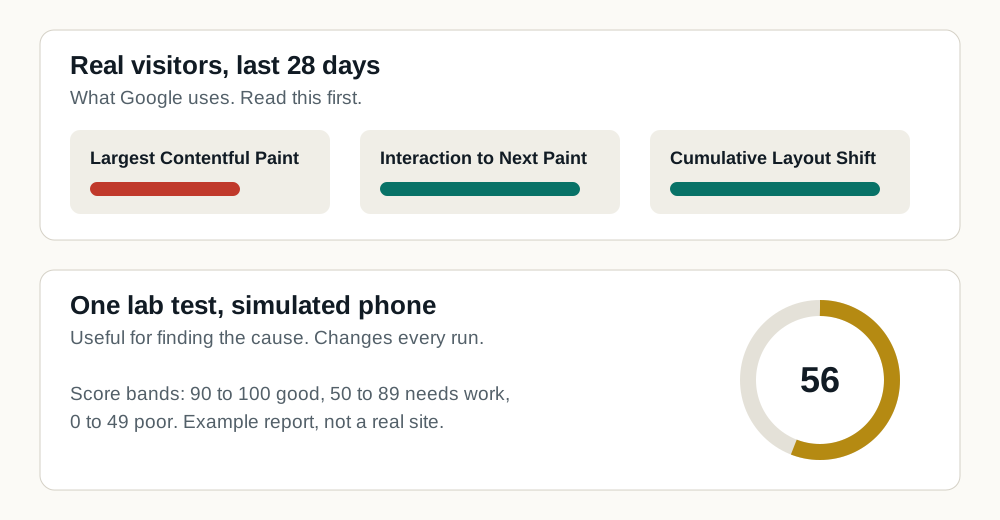
What goes into the 0 to 100 score
Blocking time carries the most weight, and on dealer sites it comes mostly from the tools loading alongside the page. That's why a dealer site can have fast photos and still score in the 40s. Each measure is defined in the website speed glossary.
| Lab measure | Points of the 100 | What it means on a dealer page |
|---|---|---|
| Total Blocking Time | Up to 30 | How long tools keep the phone too busy to respond |
| Largest Contentful Paint | Up to 25 | When the main vehicle photo or banner shows |
| Cumulative Layout Shift | Up to 25 | How much the page jumps while loading |
| First Contentful Paint | Up to 10 | When anything at all shows |
| Speed Index | Up to 10 | How quickly the screen fills in |
Why your score changes every run
The lab score comes from a single visit, and the network, the test server and your site's tools vary each time. Run a page three or four times and look at the range, not one number.
How to test a dealer website
- Test the homepage, an inventory search page and at least two vehicle detail pages. Shoppers from ads and search often land on the last two.
- Use the mobile result. It's the harder test and the one most dealer sites fail.
- Run each page a few times before drawing a conclusion. The full method is in how to test dealer website speed.
What to do with a low score
Look at what the report says is taking the time. On dealer sites it's often the tools loading alongside the page (more on why dealer websites are slow). Site Speed Engine makes those load after the vehicle and price, and we show you your PageSpeed results before and after.