01

What Google measures

These terms are Google's, and the definitions below restate what Google publishes. The sources at the foot of this page are the originals. Where a dealership needs to settle an argument, cite those instead of this page.

The three Core Web Vitals, at a glance
MetricMeasuresGoogle's good threshold
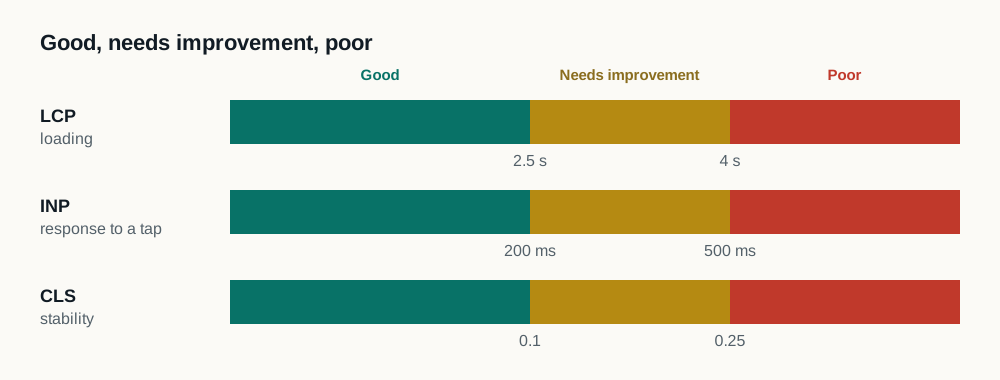
Largest Contentful Paint (LCP)Loading: when the biggest visible element appears2.5 seconds or less
Interaction to Next Paint (INP)Responsiveness, how long the page takes to react to a tap or click200 milliseconds or less
Cumulative Layout Shift (CLS)Visual stability, how much the page moves under the reader0.1 or less
Core Web Vitals
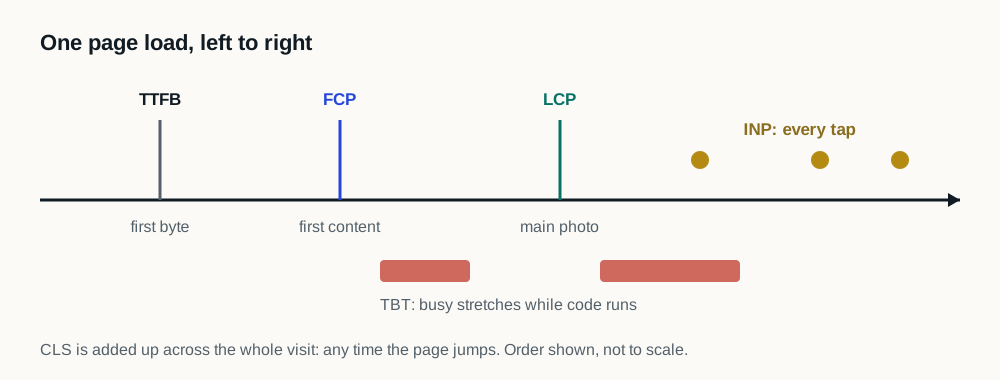
Three metrics Google publishes to describe how a page feels to the person using it: Largest Contentful Paint for loading, Interaction to Next Paint for responsiveness, and Cumulative Layout Shift for visual stability. Google assesses them from real visits rather than from a test run.
Largest Contentful Paint (LCP)
How long it takes for the biggest piece of content in the visible area to appear. On a dealership page that is usually the hero image or the first vehicle photograph. Google's good threshold is 2.5 seconds or less at the 75th percentile.
Interaction to Next Paint (INP)
How long the page takes to visibly respond after someone taps or clicks, measured across the whole visit and reported as its worst representative interaction. Google's good threshold is 200 milliseconds or less at the 75th percentile.
Cumulative Layout Shift (CLS)
A score for how much the page moves under the reader after it has started to appear. It is what makes someone tap the wrong control when a banner or a widget arrives late and pushes everything down. Google's good threshold is 0.1 or less.
The 75th percentile
The point Google reports Core Web Vitals at: three quarters of visits were at least this good and a quarter were worse. It is not an average, and it means a passing score still describes a quarter of visits that did not pass.
Field data
What real visitors actually experienced, collected from Chrome over a rolling 28-day window and published as the Chrome User Experience Report. It is what Google assesses, and it only exists for a site with enough traffic in that window.
Laboratory data
One simulated page load on emulated hardware and a throttled connection, run on demand. It answers what could happen under set conditions, which is useful for diagnosis and is a different question from what visitors experienced. Laboratory and field figures are never averaged together.
Performance score
The single number a laboratory tool reports, weighted from several laboratory metrics of one simulated run. It moves between runs on an unchanged page, which is why it is a diagnostic summary rather than a result, and why it is the figure most often misquoted in a meeting.
Page experience
Google's term for the set of signals describing how someone experiences a page beyond its information, Core Web Vitals among them. Google states that relevance and content quality carry more weight, so page experience is worth fixing for the visitor first.
02

What is on a dealership page

Third-party script
Code a dealership page loads from somebody other than the website provider: chat, trade valuation, digital retailing, inventory feeds, advertising pixels, analytics, consent and accessibility technology. Each was added for a reason, and together they compete for the same browser time the shopper is waiting on.
Tag manager
One script that loads other scripts. The container itself is small, what it loads afterwards is not, and the list visible in its interface does not describe what the browser actually fetches and runs. It is the usual place a dealership finds tags for campaigns that ended.
Main thread
The single line the browser does almost all of its work in: laying out the page, running JavaScript, and responding to taps. Two things cannot use it at once, so a long task from any one vendor makes the page unresponsive for everybody else's.
Render-blocking resource
A file the browser will not draw the page until it has fetched and processed. Every render-blocking resource sits between the visitor and the first thing they can see, which is why what is render-blocking is a decision rather than an accident.
Vehicle detail page (VDP)
The page for a single vehicle. It carries the heaviest tool stack on a dealership website, gallery, pricing, incentives, trade, retailing, finance calculators, chat and lead forms, and it is the page closest to a lead, which makes its performance the most consequential on the site.
Search results page (SRP)
The inventory listing a shopper filters and scrolls. It repeats images and re-renders on every filter change, so it exposes different problems from the homepage and needs testing in its own right rather than by proxy.
Dealer website platform
The system a dealership's website is built and hosted on, supplied by a website provider. It sets a baseline, and two dealerships on the same platform routinely produce very different results, because most of the difference is what each installed on top of it.
Dealer website performance layer
Software installed on a dealership website that is already running, which changes when the work on the page happens rather than replacing the site. A platform is the website itself; a performance layer sits on top of one and can be removed without touching it.
03

What a vendor should be able to define

These four are the terms that decide whether a speed product is safe to install and whether its results mean anything. A vendor who cannot define them on the spot is asking for performance to be taken on faith, which is the point of the questions to ask any dealer website speed vendor.

Fail open
A design requirement that if the layer cannot run safely on a page, the visitor is served the dealership's original website, unchanged and complete, rather than a half-changed version of it. The dealership is never left worse off than before installation.
What must never change
The written list a dealership agrees before installation of the things on its site that are not to be altered: typically inventory, pricing, lead forms, consent and accessibility. The dealership decides what is on the list, and every item on it is exercised on that dealership's own site before visitors see any change.
Concurrent control
Part of the dealership's own traffic left unchanged at the same time as the rest is changed, so the two are compared under the same week, the same inventory and the same advertising. A before-and-after comparison cannot separate a change from everything else that moved that week.
Predeclared method
Writing down what will be measured, on which pages, for how long, and what counts as a result, before any of it is read. It is what stops a study from being stopped at the moment the figure looks best, and that decision is invisible in a write-up unless it was fixed in advance.
Intention to treat
Analyzing every visit in the group it was assigned to, including the visits where the change did not end up applying. Dropping those makes the remaining group the visits that happened to go well, and the resulting figure describes the selection rather than the change.
Split test
Running two versions at the same time on the same site's traffic and comparing them. On a dealership site it is the only way to tell a real change from a busy sales weekend, a new advertising flight, or a competitor's inventory arriving.
Rollback
Removing the layer and returning the site to exactly what it was. The questions that matter are how it is done, how quickly, and who at the dealership can start it without waiting for the vendor.
04

How to use this page

Every definition above has its own link. If a vendor's proposal or report uses one of these words, link them the definition and ask whether theirs matches: a difference in what a word means is usually a difference in what is being offered.

Where a term is Google's, the sources below are the original documents. Where it is this industry's, this page is written to be the plain version, not the marketing one, and the full method this site measures by sets out how each of the evidence terms is applied here.

A map splitting the vocabulary used in dealership website speed conversations into three groups by who defines each term: the words Google publishes definitions for, the words that describe what is on a dealership page, and the words a speed vendor uses to describe failure and evidence. Knowing which group a term belongs to tells a dealership who can be asked to define it.
Which of the three groups a term belongs to tells a dealership who can be asked to define it, and whose definition a vendor is using.

Sources and further reading

External sources support the general technical guidance on this page. They do not represent a DealerSpeed Engine performance result.