This guide is part of the dealer website speed resource library.
What is server response time?
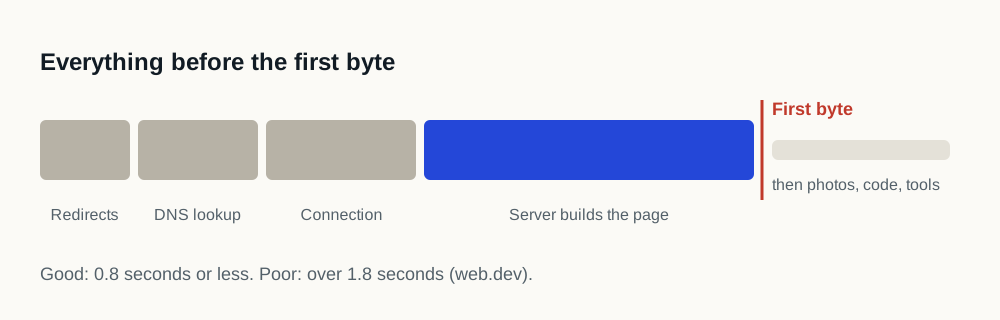
Server response time is the wait between the browser asking for a page and the first byte of that page coming back. Everything else, the stylesheet, the photographs, the scripts, the rendering, happens after it, which is why it is the one number that is added to every other number on the page instead of overlapping with them.
On a dealership website the response is not usually a static file being read off a disk. It is an application assembling a page: looking up the vehicle, the pricing, the incentives and the availability, often from more than one system. That is real work, and how long it takes is a property of the platform and its hosting instead of of anything the dealership installed.
How do you tell a slow host from a heavy page?
By reading the two figures separately, which every standard tool reports. If the first byte is quick and the page still feels slow, the problem is what the page loads afterwards. If the first byte is slow, nothing downstream can compensate. A perfectly optimized page that starts late finishes late.
| Symptom | What it points to | Who can change it |
|---|---|---|
| Slow first byte, light page | Application or hosting response | The website platform provider |
| Quick first byte, slow to become usable | Page weight and script execution | The dealership's tool stack |
| Slow first byte only on some templates | One page type doing expensive work, often inventory search | The platform provider, per template |
| Slow first byte only for some visitors | Distance, or a cache that is not being hit | Delivery configuration |
| Both slow | Both problems at once, which is common | Both, and worth sequencing deliberately |
Does a content delivery network fix this?
A content delivery network fixes distance. A network of edge locations shortens the trip for a visitor who is far from the origin server, and for static files it can answer without involving the origin at all.
It does not make a slow application faster. If the page has to be assembled per request, and an inventory page usually does, then the work still happens at the origin and the visitor still waits for it. A delivery network in front of a slow application produces a page that arrives efficiently, late.
What should a dealership actually do about it?
- 01
Measure it per template
Homepage, a search results page and a vehicle detail page. They frequently differ by more than the difference between two platforms, because they do different amounts of work.
- 02
Measure it more than once
A single measurement catches a cold cache, a deployment or a busy moment. Repeat across times of day before concluding anything.
- 03
Separate it from the rest
Write down the response time and the page weight as two numbers. Most arguments about dealership website speed are two people describing different ones.
- 04
Take it to the right vendor
Response time is the platform provider's to answer. Page weight is the dealership's stack, and the third-party inventory is the evidence for that half.
- 05
Ask what is being assembled
If one template is much slower than the others, something on it is doing expensive work per request. That is a specific question with a specific answer, not a general complaint.
Where does this fit against the shopper metrics?
Server response time is not a metric Google reports directly. It is a component of one: the wait before the first byte is part of the total time before the largest visible element appears. A page cannot paint faster than it arrives.
That is the practical reason to settle it first. Optimizing images and scripts on a site whose first byte is slow improves the part you can see and leaves a fixed delay underneath everything, and it is a frustrating way to spend a quarter.
Sources and further reading
External sources support the general technical guidance on this page. They do not represent a DealerSpeed Engine performance result.