01

What INP measures

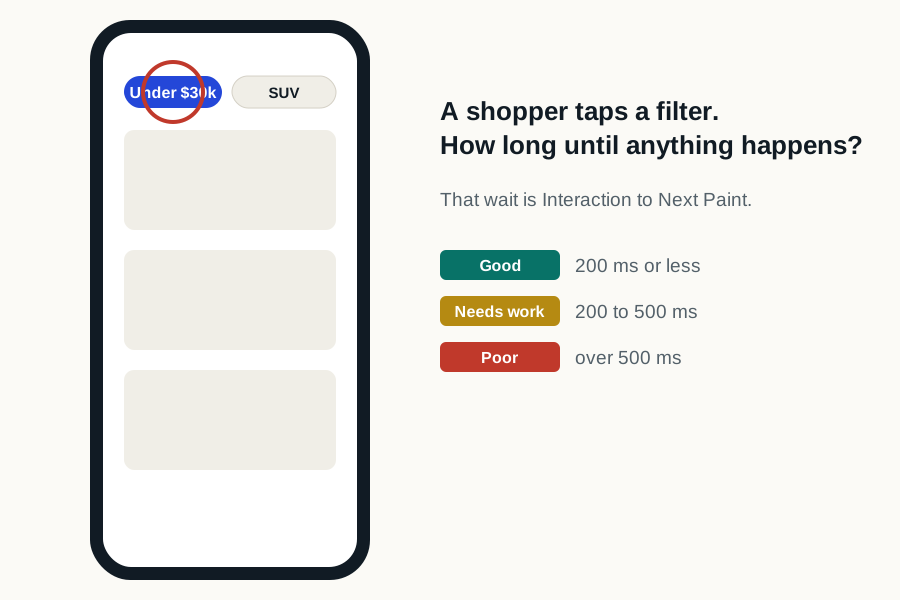
INP observes the latency of click, tap and keyboard interactions and reports a representative high-latency interaction for the page visit. The measurement includes input delay, event processing, and the time until the next paint.

Google’s current Core Web Vitals guidance classifies 200 milliseconds or less as good at the 75th percentile. The threshold defines the metric and is not a claim about any untested dealer website.

Where Interaction to Next Paint is usually spent on a dealer page
PhaseWhat happensWhat lengthens it on a dealer site
Input delayThe browser waits for the main thread to be free before it can run the handlerA tag manager, chat bootstrap or analytics script still executing when the shopper taps
Processing timeThe event handler itself runsA gallery, payment calculator or filter that recomputes everything on each change
Presentation delayThe browser lays out and paints the resultA large DOM on an SRP, or a layout invalidated across the whole page
Google's Core Web Vitals thresholds at the 75th percentile: Largest Contentful Paint good at 2.5 seconds or less and poor beyond 4 seconds, Interaction to Next Paint good at 200 milliseconds or less and poor beyond 500 milliseconds, Cumulative Layout Shift good at 0.1 or less and poor beyond 0.25.
Where the 200-millisecond INP threshold sits against the other two Core Web Vitals. All three are judged at the 75th percentile of real visits.
02

High-value dealer interactions

  • Open mobile navigation
  • Filter or sort inventory
  • Advance a VDP gallery
  • Open chat, trade, or digital retailing
  • Reveal pricing or submit a validated form
03

Trace the main-thread work

Use a performance trace to find long tasks, repeated handlers, rendering work, and third-party execution around the slow interaction. The visible tool is not always the source of the blocking task.

04

Keep interaction testing functional

Measure both response time and outcome. A button that paints quickly but opens the wrong state, loses focus, or fails to complete the shopper task does not pass.

05

Where do INP problems hide on a dealership site?

  • Inventory filters that rebuild the entire results list on every change
  • Gallery controls competing with chat initialization for the main thread
  • Payment and trade calculators recalculating on every keystroke
  • Tag managers firing a queue of tags while a shopper is scrolling
  • Form validation that runs heavy logic on each field change
06

How do I diagnose Interaction to Next Paint?

  1. 01

    Use field data first

    INP is a real-user metric. A laboratory test cannot tell you what your shoppers experienced because it does not interact the way they do.

  2. 02

    Record a performance trace

    Browser developer tools show long tasks on a timeline. Anything over 50 milliseconds is worth understanding; anything over 200 is a problem.

  3. 03

    Interact the way a shopper does

    Tap a filter, open the gallery, start the payment calculator. The delay usually appears where the tools cluster.

  4. 04

    Attribute the long tasks

    The trace names the script responsible. The vendor named there is usually one you can have a conversation with.

07

Which dealer interactions does INP usually catch?

The ones that matter most commercially, which is not a coincidence. Inventory filters are the classic case: a shopper taps a trim or a price band and the page has to re-render a list while several third-party scripts are still initializing. Payment and finance calculators are the second, because they combine input handling with a calculation and often a network call. Gallery navigation on a vehicle detail page is the third.

What INP is measuring is not how fast the interaction was handled but how long the shopper waited to see anything happen. A handler can finish its own work almost instantly and still feel slow, because the shopper waits from the moment they tap until the screen responds, including all the time the main thread spent busy with something else first. The whole wait is what the metric counts, because it is what the shopper actually experiences.

INP problems on dealership sites are usually not caused by the control being tapped, for exactly this reason. The real cause is whatever else was running at that moment: a tag manager initializing, a chat widget polling, a retailing tool hydrating.

08

How should a dealership investigate a bad INP?

Reproduce it with a trace open, tapping the specific control that feels slow instead of measuring the page in the abstract. What you are looking for is the long task that occupied the thread, and the script that owns it, which is frequently a different vendor from the one that owns the control.

Then measure the outcome as well as the latency. A button that repaints quickly but opens the wrong state, loses keyboard focus or fails to complete the lead submission has not been made better by becoming faster, and this is the metric where that mistake is easiest to make.

Sources and further reading

External sources support the general technical guidance on this page. They do not represent a DealerSpeed Engine performance result.