01

What CLS measures

CLS accumulates scores for unexpected layout shifts during the page’s lifetime. Movement close to a user input can be excluded when it is an expected response, while unrelated late movement remains relevant.

Current Core Web Vitals guidance classifies 0.1 or less as good at the 75th percentile. That metric threshold is not a performance promise.

What moves on a dealership page, and what stops it
What shiftsWhy it shiftsThe fix
Vehicle photographyThe image has no width and height, so the browser reserves no space until it arrivesState intrinsic dimensions, or an aspect ratio, on every image
Chat launcherIt is injected late and inserted into the document flowPosition it as an overlay so it takes the page out of flow entirely
Consent bannerIt appears after first paint and pushes the page downOverlay it, and reserve its space if it must sit in flow
Price, payment or incentive blockA value arrives from a feed after the surrounding page has renderedReserve the block's height before the value resolves
Headings and body copyA web font swaps in with different metrics from the fallbackMatch the fallback's metrics so the swap does not reflow the text
Google's Core Web Vitals thresholds at the 75th percentile: Largest Contentful Paint good at 2.5 seconds or less and poor beyond 4 seconds, Interaction to Next Paint good at 200 milliseconds or less and poor beyond 500 milliseconds, Cumulative Layout Shift good at 0.1 or less and poor beyond 0.25.
Where the 0.1 CLS threshold sits against the other two Core Web Vitals. All three are judged at the 75th percentile of real visits.
02

How do I fix layout shift?

  1. 01

    Reserve space for every image

    Explicit dimensions or an aspect ratio. The browser then leaves the right gap before the image arrives, and nothing moves.

  2. 02

    Reserve space for injected content

    If a banner slot may or may not fill, give it a fixed height so the page does not jump when it decides.

  3. 03

    Make overlays overlay

    A widget that sits above the page costs nothing in layout shift. One that inserts into the flow costs on every page view.

  4. 04

    Match font metrics

    Size-adjust and fallback metric descriptors keep text from reflowing when a webfont replaces the fallback.

03

What moves on a dealership page, and where it lands

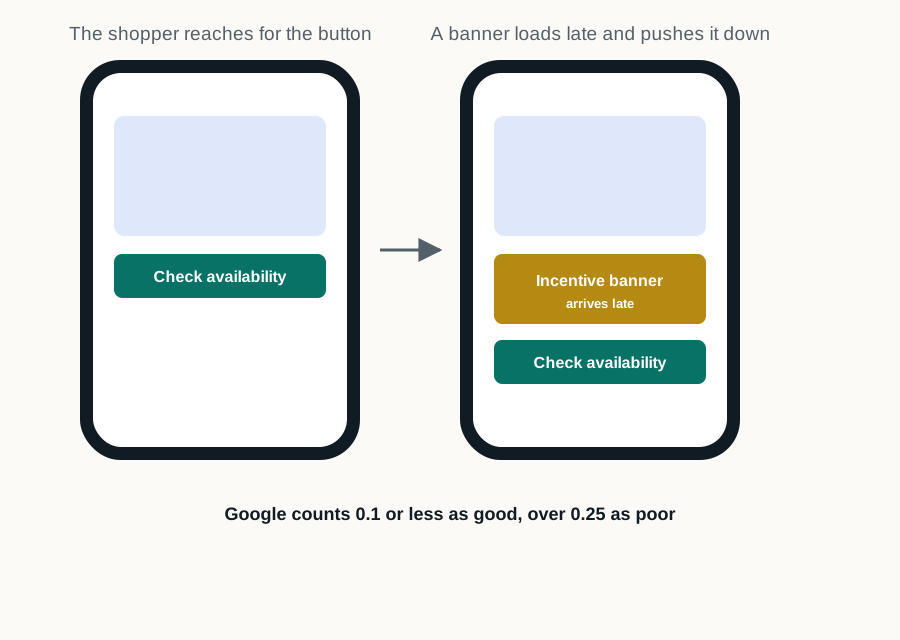
Layout shift is the one Core Web Vital a shopper can describe without knowing the term. It is the price that jumps as they read it, the lead button that moves out from under a thumb, and the disclosure that pushes the finance calculator down the page halfway through a tap.

On dealership sites four sources account for most of it. Vehicle images without reserved dimensions, so the page reflows as each photograph decodes. Incentive and pricing banners injected after render, usually from a different system than the price itself. Consent and promotional overlays that arrive late and push everything down. And chat launchers that reserve no space until they load.

The cost lands in exactly the wrong place. A shift that happens as a shopper reaches for a lead action does not merely annoy them; it can submit the wrong thing or nothing at all. That is a conversion problem wearing a performance metric's clothing.

04

How is layout shift actually prevented?

Verify by watching instead of by scoring. A visual replay of the page loading on a phone shows at a glance what a metric describes in the abstract, and it is the only reliable way to tell whether the movement lands near something a shopper is trying to use: with the cache cleared, since a warm cache hides the shifts a first-time shopper sees.

Sources and further reading

External sources support the general technical guidance on this page. They do not represent a DealerSpeed Engine performance result.