01

Why do dealer websites carry so many scripts?

  • Inventory and merchandising
  • Chat and messaging
  • Trade and instant-offer tools
  • Digital retailing and payment experiences
  • Analytics, call tracking and advertising
  • Offers, incentives and personalization
  • Compliance, accessibility and reputation tools
02

Why do third-party scripts slow a site down?

Each tool can create network requests, execute JavaScript and change the page. A browser still has finite resources, especially on a mobile device. If too much work occurs during the critical first seconds, the useful dealership content waits.

03

Do I have to remove tools to get faster?

Dealers purchased these products for a reason. A faster empty website is not automatically a better dealership website. The two categories worth looking at first are usually chat and analytics and advertising tags, because the first loads early by design and the second accumulates without an owner.

Speed Engine focuses on ordering and prioritization so important content can arrive sooner while the site retains its business tools. If you want that assessed on your own pages, ask for a speed analysis and we will tell you what is actually costing you the time.

04

What should be measured?

A fair analysis distinguishes the website platform from the technology installed on top of it, along with the dealership's own customizations, and also tests more than one page and more than one moment in time.

05

How should script work be prioritized?

A classification is not a vendor scorecard. The category documents timing, not quality, when a browser resource is needed on a specific page, so the loading sequence can be evaluated consistently.

  • Critical: navigation, primary content, first inventory or vehicle details
  • Early interaction: filters, lead actions and controls a shopper may use immediately
  • Conditional: chat, trade or retailing interfaces that open after an action
  • Background: analytics, attribution and services that do not create the first useful view
06

How do you build a loading-path record?

  1. 01

    Capture

    Save the network waterfall, main-thread activity and visual loading sequence under repeatable mobile conditions.

  2. 02

    Attribute

    Map each early request to the platform, dealer content, inventory or a named third party.

  3. 03

    Prioritize

    Identify work blocking the first useful content or delaying an expected interaction.

  4. 04

    Verify

    Repeat the same page set after a change and confirm that required functions still work.

07

What third-party scripts does a typical dealership site load?

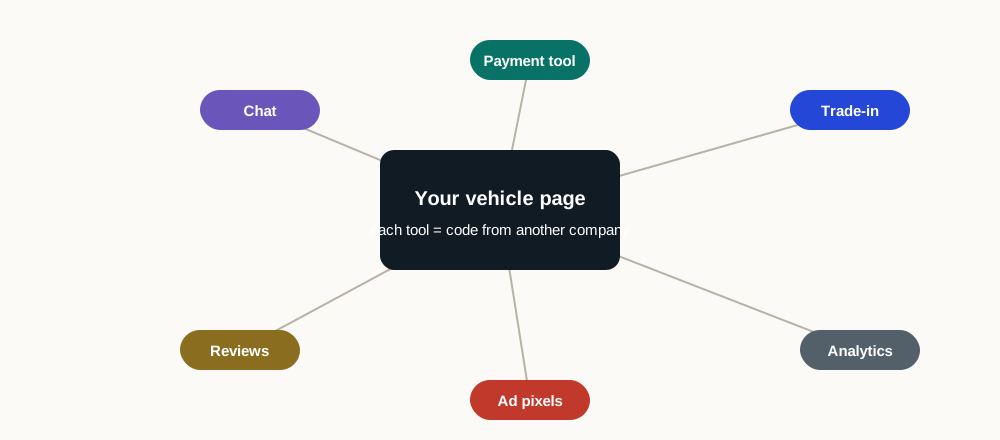
Most dealership websites carry between forty and eighty third-party requests on a vehicle detail page. The list is remarkably consistent across rooftops because the categories are driven by how dealerships operate, not by which platform they chose.

  • Inventory and pricing feeds, often refreshed on every page view
  • Chat and messaging, frequently more than one vendor on the same page
  • Trade-in valuation, which typically loads its own framework
  • Digital retailing and payment calculators
  • Analytics, tag management and session recording
  • Advertising pixels, retargeting tags and attribution scripts
  • Consent management and accessibility overlays
  • Review widgets, incentive feeds and OEM compliance scripts
08

Why does the total matter more than any single tool?

Each vendor evaluates its own script in isolation and concludes it is lightweight. The assessment is usually accurate and completely beside the point. The browser does not experience the tools one at a time: it experiences all of them arriving during the same loading window, competing for one main thread.

Removing a single vendor rarely produces the improvement a dealership expects, and adding one more tool rarely feels like it changed anything, because the cost is cumulative. It accrues quietly over years of vendor decisions that were each defensible on their own.

Two panels contrasting how a third-party script is assessed with how it is experienced. On the vendor's side, each provider evaluates its own script on its own, on a test page, and concludes it is lightweight. An assessment that is usually accurate. On the shopper's side, every script arrives inside the same loading window and competes for one main thread, and no vendor is responsible for that total.
The same scripts, assessed one at a time and received all at once. Both columns are usually accurate; only one of them is the shopper experience.
09

When does each script genuinely need to run?

  1. 01

    Required before render

    Consent management, anything legally required, and resources the page cannot lay out without. The list should be short and it should be written down.

  2. 02

    Required on interaction

    Chat, trade tools, payment calculators and gallery controls. The tools must be ready when a shopper reaches for them, which is not the same as ready at page load.

  3. 03

    Required eventually

    Analytics, advertising pixels and attribution. The trackers need to fire; they do not need to fire first, and nothing about their function depends on winning the race.

  4. 04

    Not required at all

    Tags for campaigns that ended, vendors no longer under contract, and duplicate tools doing the same job. Most dealerships find several once they look. Everything in the first two categories is unsafe to defer. Each for a different reason. Everything after that is safe to move later or remove outright.

10

Where should script optimization start?

On a franchised rooftop the inventory has to record one more thing: which of these a manufacturer program or a co-op rule requires, because removal advice does not apply to a tag the dealership is not allowed to remove. The safe sequence for optimizing third-party scripts exists because the failure mode of naive optimization is deferring something another script depended on, which breaks a tool in a way nobody notices until a shopper complains. Build the map of what depends on what first, then change one thing at a time, then verify the shopper paths still work.

Run the free speed test to see your own third-party list ranked by how long each provider blocked the browser. The ranking is usually the whole conversation: the top three entries typically account for most of the delay.

Sources and further reading

External sources support the general technical guidance on this page. They do not represent a DealerSpeed Engine performance result.