Dealer website platforms

Why is my Dealer.com website slow?

A Dealer.com site is usually slow for the same reason as any dealer site: the tools added on top of the platform all load with the vehicle. Dealer.com controls the templates and hosting; your store controls chat, trade-in, payment, review and tracking tools. You can speed it up without leaving the platform.

Get my free speed analysisTest my website

Where a Dealer.com vehicle page loses time

  • Trade-in offers, payment calculators and deal builders that start as the page opens.
  • Chat and texting widgets, sometimes two from different vendors.
  • Tracking for every ad platform and agency, past and present.
  • Full-size photos in the gallery, and specials banners that push the page when they arrive.

Platform or add-ons?

Run a Dealer.com vehicle page, not only the homepage, through the free speed test on mobile. Its list of outside code, ranked by how long each held the page, shows whether the wait is Dealer.com itself or what the store added.
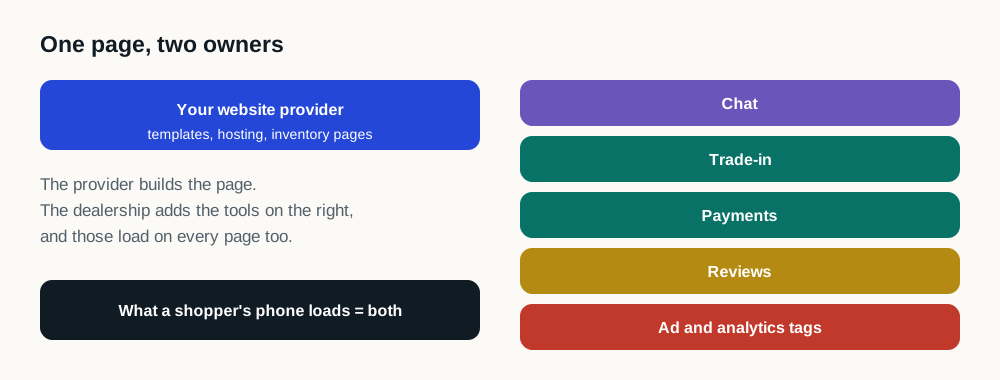
Left: the website provider supplies templates, hosting and inventory pages. Right: the dealership adds chat, trade-in, payment, review and tracking tools. A shopper's phone loads both on every page.
On a Dealer.com vehicle page, most of the right-hand column is the store's choice.

What to ask Dealer.com

  • How fast does the server answer on vehicle and inventory pages? Google's guidance is 0.8 seconds or less for the first byte.
  • Are vehicle photos sent at phone size, and is the gallery loaded as the shopper swipes?
  • Which scripts on the page are Dealer.com's, and which were added for the store?
  • Can banners and specials reserve their space so the page doesn't jump?

Faster without a migration

Leaving Dealer.com means months of rebuild, and the same tools usually go straight onto the new site. Site Speed Engine runs on the Dealer.com site you have, puts the vehicle and price first, and can be turned off any time.

Sources

Questions

Can I speed up a Dealer.com site without switching providers?

Yes. Site Speed Engine works on top of a Dealer.com site and changes the order things load in, so the vehicle and price show first. Nothing on the platform changes.

Who controls the chat and trade-in tools on a Dealer.com site?

Usually the store or its agencies. Dealer.com runs the templates and hosting; the add-on tools are chosen dealer by dealer.

Why does my Dealer.com site fail Core Web Vitals on mobile?

Most often layout shift from banners that arrive late, and slow taps from tools starting up. Test a vehicle page on mobile to see which measure fails.